THE FREE SHELF
Support the studio.
Get cool stuff.
Everything here is free now — every download, every extra. The shelf was never where the studio earns its keep; that's real work for real people. This is our real little store — and you're welcome here.
Jump to: Downloads · Apps · Free · Send a gift · Install guide · Find It — the one true list
Downloads — free, every one
Every game here is free to play on the web, forever — and now the downloads are free too. These are the ones with a real install file, so you can own them on your own computer — no browser, no internet, double-click and play. No payment, no email, no catch: tap Download and the file is yours. No packs. No bundles. And a game only gets a line here when there's a real file we can actually send you. The rest are play-only for now.
Block Drop
the original 8-bit falling-block dropper, on its own page.
345.8 KB · version v2
Download — FREEFree to play on the web: play it here
Snake
the 8-bit classic, LeviNet style, on its own page.
347.7 KB · version v2
Download — FREEFree to play on the web: play it here
Brick Smash
our brick-breaker, on its own page.
351.3 KB · version v2
Download — FREEFree to play on the web: play it here
Levi's City
Our 8-bit city builder. Roads, zones, power — and a meteor button.
359.0 KB · version v2
Download — FREEFree to play on the web: play it here
Paddle Clash
Our one-on-one paddle duel against the CPU. First to 5 takes the match.
348.4 KB · version v2
Download — FREEFree to play on the web: play it here
Rivet Run
Our climb-and-dodge platformer. Grab every rivet, dodge the patrol bots.
364.6 KB · version v2
Download — FREEFree to play on the web: play it here
Stack Storm
Our one-tap timing stacker. Land it perfect for the bonus.
351.7 KB · version v2
Download — FREEFree to play on the web: play it here
Starfall
Our star-catching arcade game. Snatch the falling stars, dodge the dark.
345.8 KB · version v1
Download — FREETiny Lives
Our tiny 8-bit life sim. Eat, sleep, play, call a friend, adopt a cat.
350.2 KB · version v2
Download — FREEFree to play on the web: play it here
Bookkeeping
The 3-minute animated explainer video + the Know the Machine field guide: your phone isn't listening the way you think it is — it's bookkeeping.
Claim it — FREEApps — not games, these live on your computer
Real compiled programs from the studio — screensavers and desktop software, Windows, classic installers, yours to keep. Free, same as everything.
Night Crew
The store's night shift as a Windows screensaver — the night shift never ends.
116.7 KB · version 1.0
Download — FREEDream Drift
An After Dark-style Windows screensaver — 8 dreamy modules.
162.8 KB · version 1.1
Download — FREELEVINET RADIO LR-90
4 endless chiptune stations. Pure 90s tuner. Coming soon.
Coming soon — from the lab.
PIXEL PAINT 90S
32x32 pixel editor with PNG export. Coming soon.
Coming soon — from the lab.
HANGOUT CLOCK
Fullscreen 90s screensaver clock. Coming soon.
Coming soon — from the lab.
Free — no account, no catch
Everything on this shelf is free. These are the things we build in the open and want people using — for Windows, phones, and Linux alike.
Safe & Sound 1.0 — for Windows
Walk your house room by room and write down what's in it — prints a clean home inventory report.
9.7 MB · version 1.0
Download — FREESafe & Sound 1.0 — for Linux
Walk your house room by room and write down what's in it — prints a clean home inventory report.
29.1 KB · version 1.0
Download — FREESafe & Sound 1.0 — for Android (emulator files)
Walk your house room by room and write down what's in it — prints a clean home inventory report.
29.7 KB · version 1.0
Download — FREESafe & Sound 1.0 — on your phone
No download, no install — Safe & Sound runs right in your phone's browser, Android or iPhone.
10.1 KB · version 1.0
Open Safe & Sound — FREEThe Recipe Box 1.0 — for Windows 3.1
The studio's recipe box, built for the Windows 3.1 corner — free, yours to keep.
41.5 KB
Download — FREE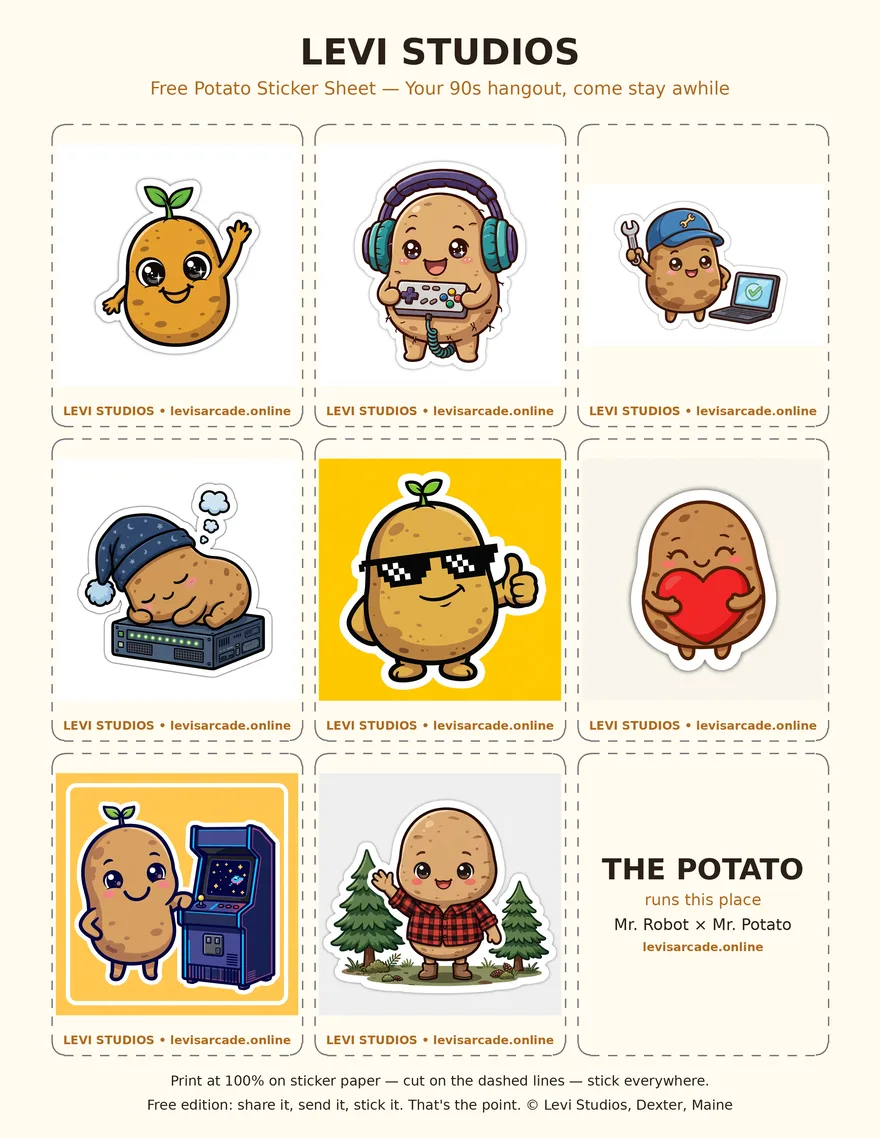
Potato Sticker Sheet — FREE
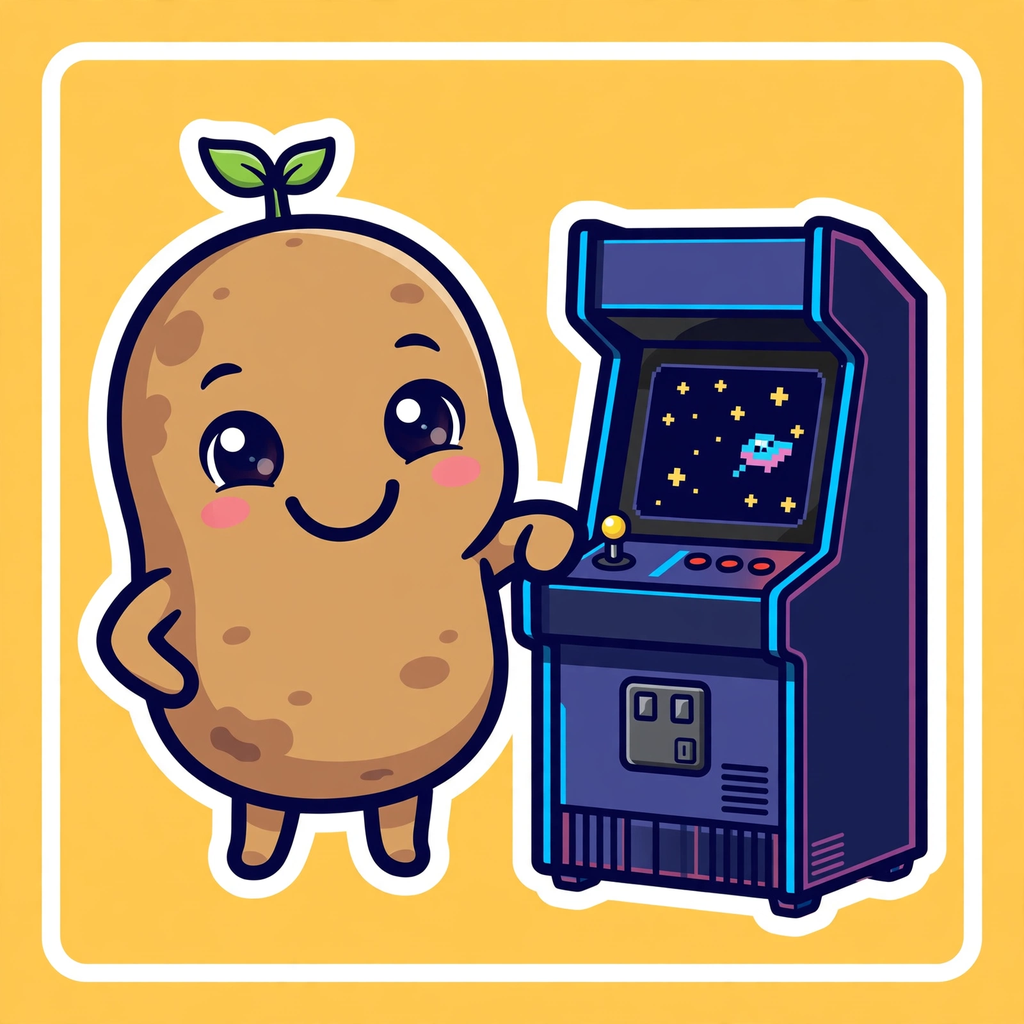
The studio potato, eight ways: hero, gamer, repair bench, night shift, cool, hug, arcade, and the Dexter woods. One printable sheet — plus each potato on its own. Free: share it, send it, stick it.
Download the sheet (PDF) — FREESend one to a friend: Hero · Gamer · Repair · Night Shift · Cool · Hug · Arcade · Woods







Send a gift — power-ups
Fuel the build. Gifts are never expected — every gift is a continue. It goes straight back into the build: better games, better videos, a better site. Thank you for even being here.

$LeviBarron83
Scan with your Cash App to send a gift, or tap an amount:
Safe and simple: tapping an amount opens Cash App with it already filled in — you can't get it wrong, and you can change it to anything you like.
★ Founding Supporters
$1 and up — every founding supporter's name goes up here in gold. These are gifts, plain and simple.
No names yet — the first one could be yours.
Buying for somebody else?
Pick them something from the shelf above — it's all free — and send them the link so the download lands with them.
Browse the shelfHow installing works — the picture guide
First time installing one of our games? You're not alone with it — here's every screen, step by step. It's old-school on purpose: download, install, icon on your desktop, play.
1. Download your game.
Tap the download button on the game's card. One ZIP file lands in your Downloads folder — that's the whole game, everything in it.
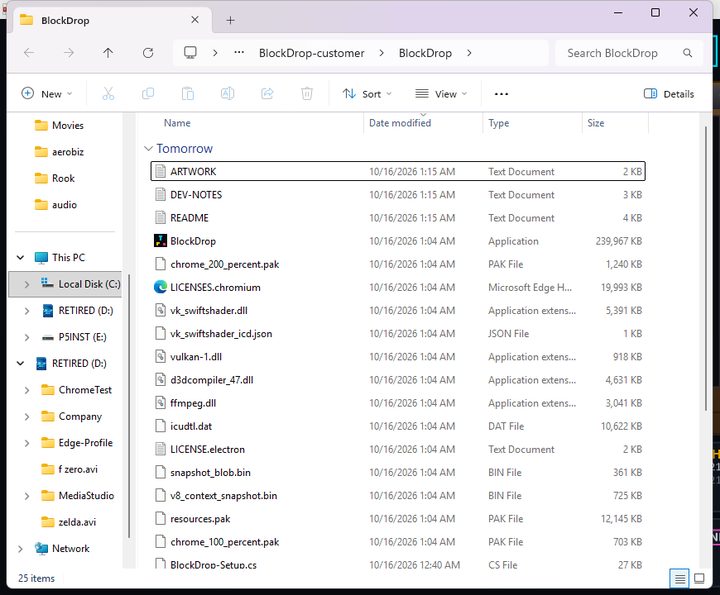
2. Open the ZIP.
Find the file in Downloads and double-click it. Inside you'll see the installer, a README text file about the game, and the artwork — that's the whole package.
3. Run the installer.
Double-click the Setup file. It puts the game in its own folder and its icon on your desktop — old-school, just like installs used to be.
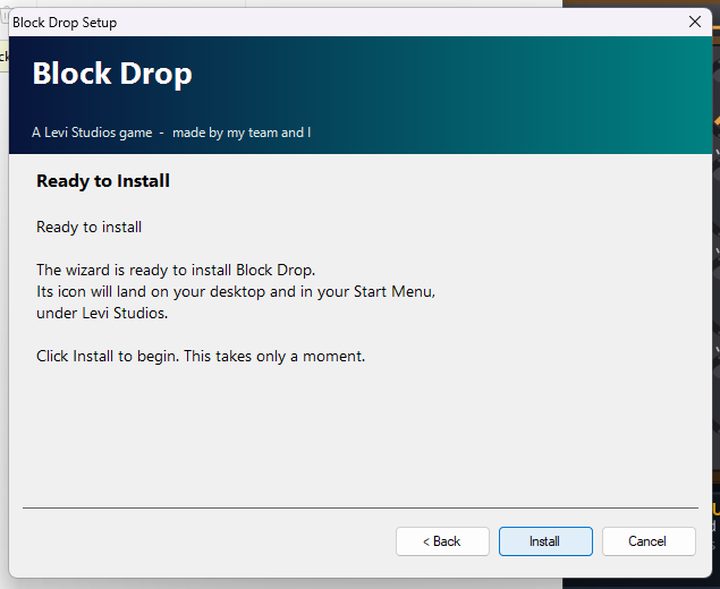
4. Windows may warn you — that's expected.
A blue screen may say “Windows protected your PC.” We don't have a code-signing license yet, so Windows doesn't recognize us. It's safe to continue. Our installer tells you the same thing itself, before Windows ever gets a say:
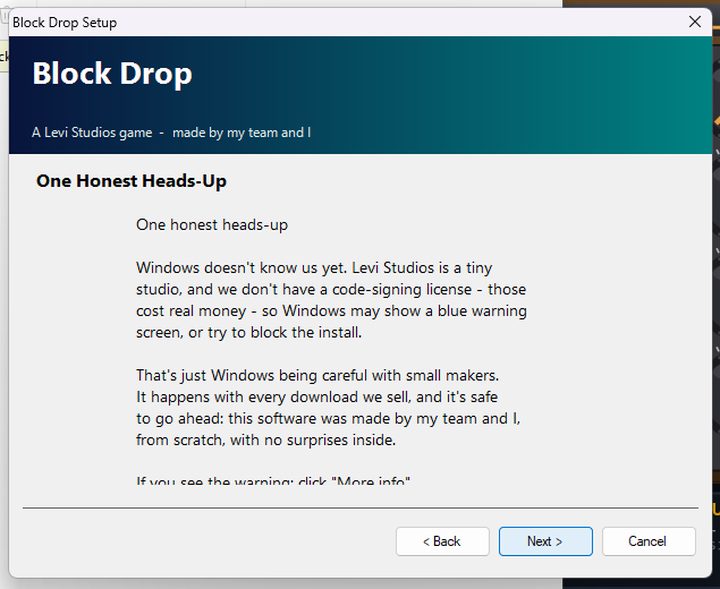
5. Tap “More info.”
It's the small link on the warning screen.
6. Tap “Run anyway.”
The screen opens up and shows this button. One tap and the install finishes.
7. Your icon's on the desktop.
That's your game — its own icon, in its own folder, with its README and artwork right there with it.
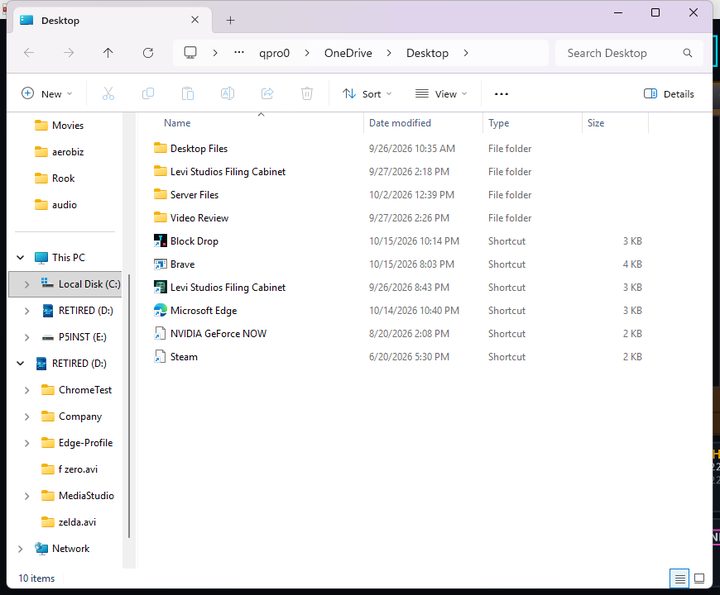
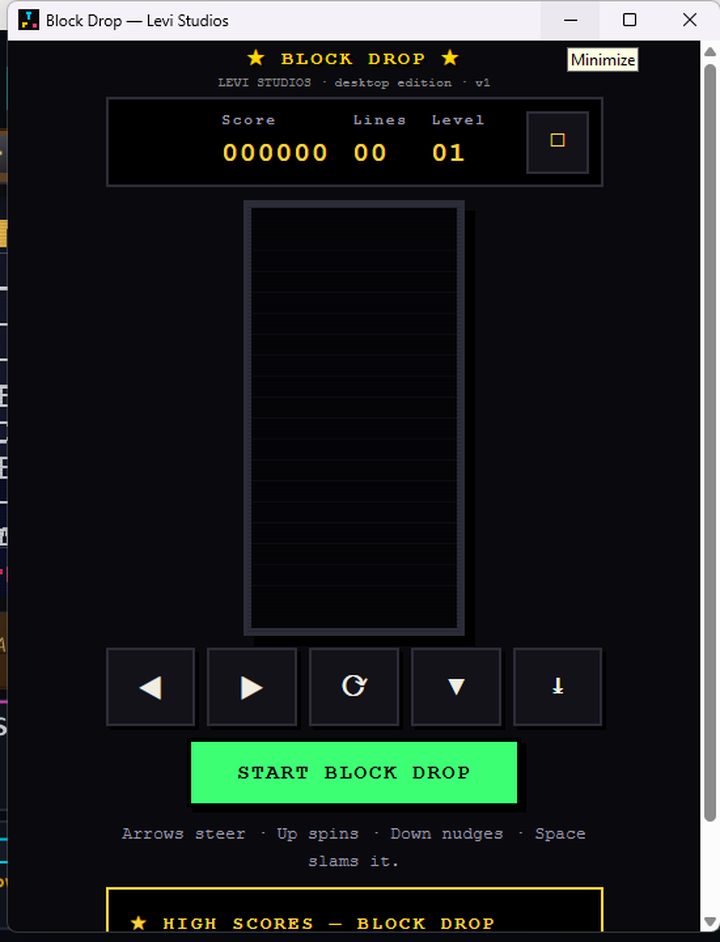
8. Double-click and play.
No accounts, no internet needed, no funny business. Your scores save on your own computer. Welcome to Levi Studios.
More doors
Find It
Every game and download on one true list — prices, sizes, and the fingerprints to check every file yourself.
Open Find ItThe Retired Shelf
Stuff that used to be live and earned its rest. Archived with a date stamp — never deleted, never lost.
Browse the shelfThe quiet fine print
Also find us: TikTok @thatbeardeddudelevi · Levi Studios on Facebook · Instagram & Threads @qpro0019